
How to Order Food in China with a QR Code
In many Chinese cafés, milk-tea shops, bakeries and snack kiosks nobody takes your order. You scan a QR code, order and pay on your own phone, and wait for your number to be called – in Chinese. Once you have done it, it takes a minute. So do it once here first: ten steps on photos and screenshots from a real cookie and coffee kiosk, with practice screens for the parts a photo can’t show – filling the cart, paying, the ticket printing at the counter.
What you need: Alipay or WeChat on your phone with an international card linked, and mobile data. Both are easier to set up at home – they are on the China travel checklist. For Alipay there is a step-by-step guide with screenshots.
Practise QR-code ordering: ten steps, one order
Tap the numbered dots for a translation, find the QR code yourself and scan it. Steps 6 and 7 are an interactive copy of the shop’s mini-program: add items, choose options, check out and pay, just as you would on the real screen – without ordering anything. Photos and screenshots are marked as real; the practice screens are simplified versions of what you will see.

Alipay home screen, simplified
胡萝卜蛋糕曲奇
Carrot cake cookie¥28/份海盐芝士拿铁
Sea salt cheese latte¥26/杯选规格 = choose options怪兽曲奇
Monster cookie¥26/份抹茶杏仁曲奇
Matcha almond cookie¥25/份
- 海盐芝士拿铁冰 / 少糖×1 ¥26
- 胡萝卜蛋糕曲奇×1 ¥28
合计 Total ¥54
备注 Note, e.g. 少冰 = less ice
口味、偏好等要求
🔔 叮!您有新的订单
“Ding! You have a new order.”
扫码点餐 · 堂食
取餐号 pickup no.023
海盐芝士拿铁 ×126.00
冰 / 少糖
胡萝卜蛋糕曲奇 ×128.00
实付 paid54.00
已支付 · 支付宝
取餐号 Pickup number
023
制作中 · Being made…
- 海盐芝士拿铁冰 / 少糖×1 ¥26
- 胡萝卜蛋糕曲奇×1 ¥28
取餐号
023
请取餐
Step 1 of 10
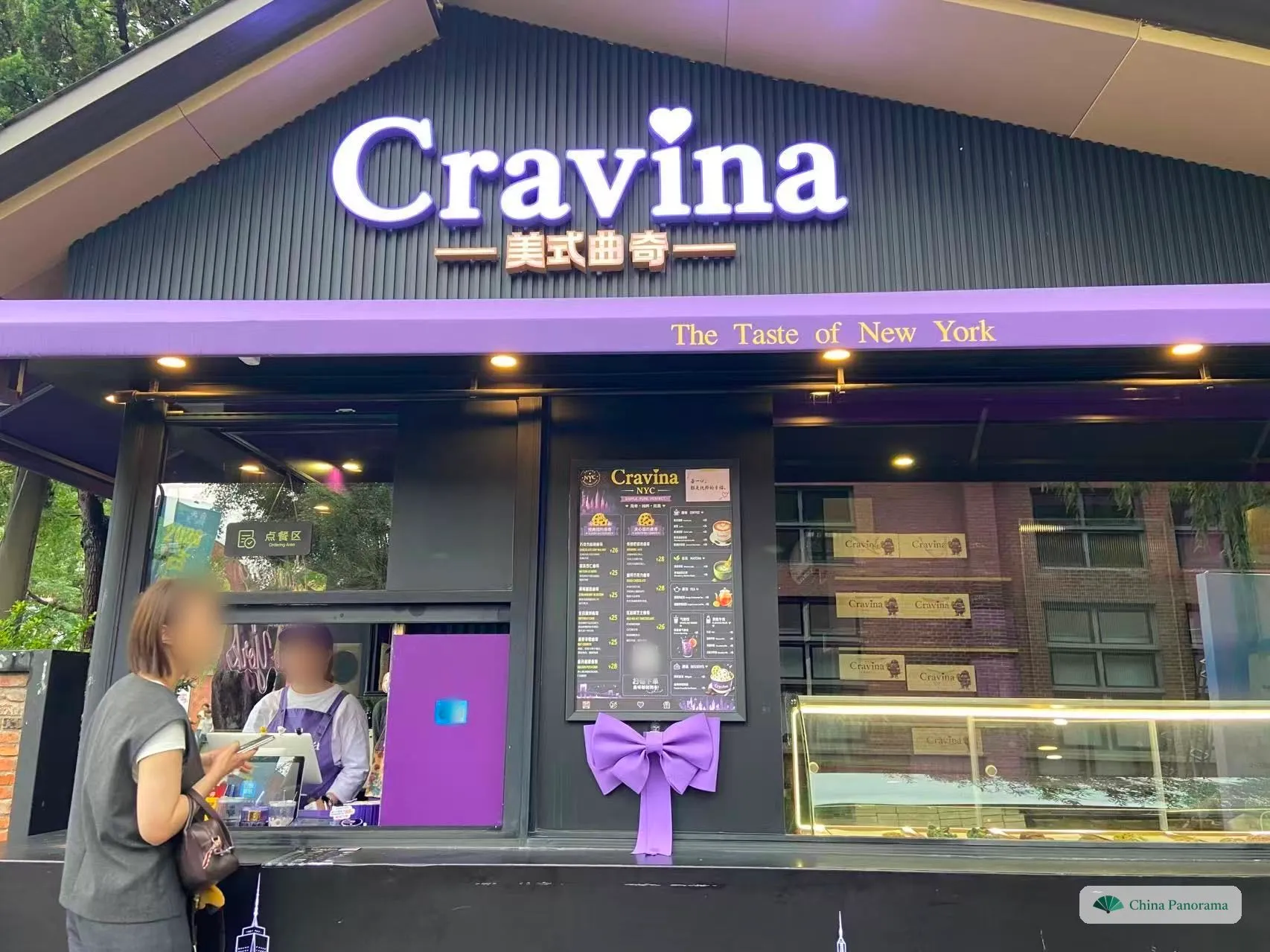
Look at what they sell
看菜品 · kàn cài pǐn
Coffee bars, milk-tea shops, bakeries and snack kiosks like this cookie shop often have no waiter and no paper menu. You order on your own phone – so first work out what you want. The picture boards outside and the display case show the real thing.
Tap the numbered dots in the photo.
Step 2 of 10
Check the prices
看价格 · kàn jià gé
The picture board outside has no prices. The board above the counter does: the plain numbers next to each item are yuan (¥, 元 yuán). If a shop has no price board at all, don’t worry – every price appears on your phone once you have scanned.
Tap dot 3 – the menu board next to the window – to zoom in.
Step 3 of 10
Find the ordering QR code
找二维码 · zhǎo èr wéi mǎ
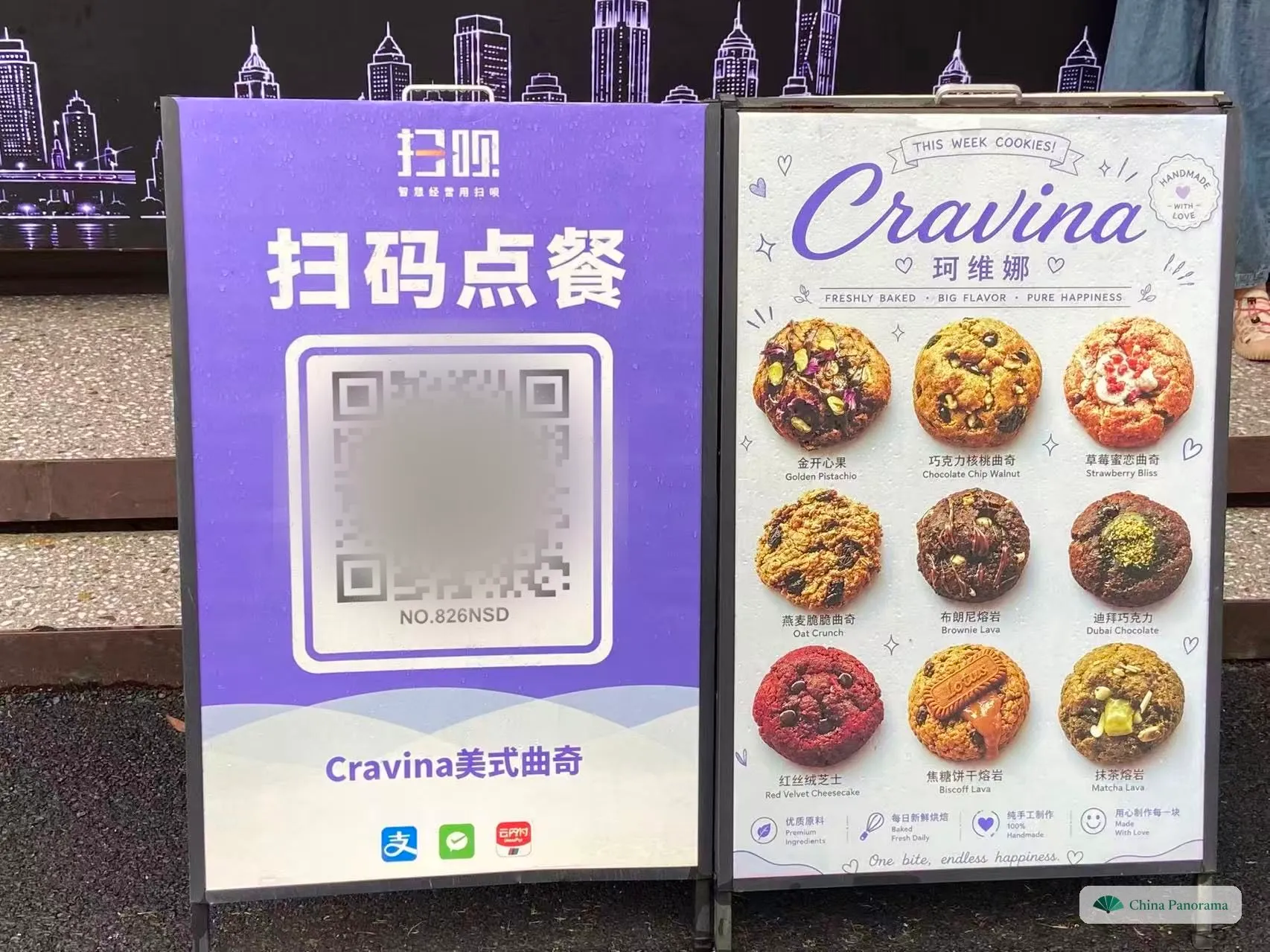
Look for a sign or sticker that says 扫码点餐 (sǎo mǎ diǎn cān, “scan the code to order”). It stands by the entrance, sits on the counter, or – in restaurants – is stuck to your table.
Two signs stand by the steps. Tap the QR code you would scan to order.
A code marked 付款 (fù kuǎn, pay) or 收款 (shōu kuǎn, receive payment) is for paying only: you type in the amount yourself, and the shop doesn’t learn what you want. For ordering you need 点餐, 点单 or 下单.
The codes in our photos are blurred, so nobody orders from the real shop by accident.
Step 4 of 10
Scan it with Alipay or WeChat
扫码 · sǎo mǎ
Open Alipay or WeChat and use the scanner inside the app – not your phone’s camera app, which usually just opens a page telling you to switch to Alipay or WeChat.
Tap 扫一扫 (Scan) at the top of the Alipay home screen.
Hold the phone 20–30 cm from the code. In poor light, the scanner has a torch button.
Step 5 of 10
The shop’s menu opens
打开小程序 · dǎ kāi xiǎo chéng xù
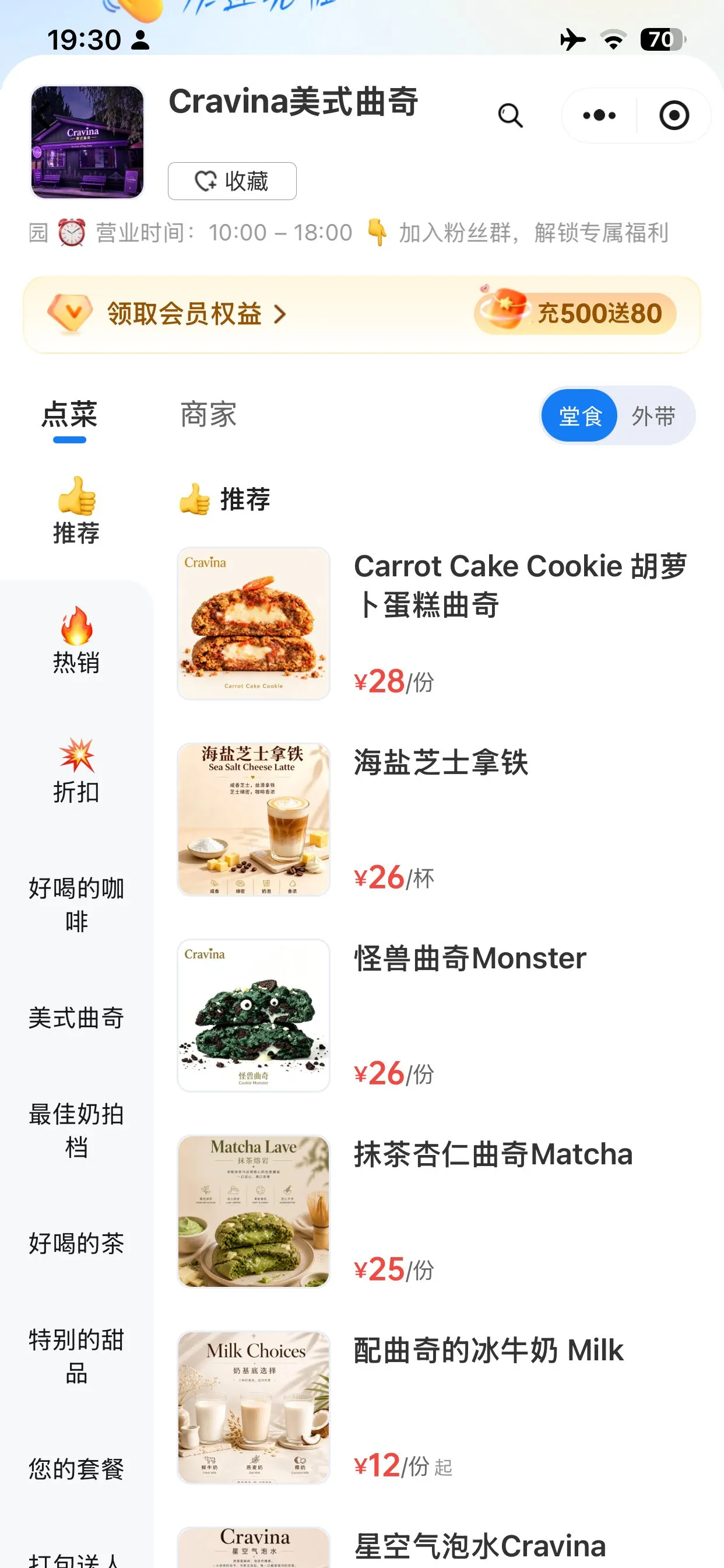
The code opens a mini-program (小程序 xiǎo chéng xù): the shop’s own ordering page, running inside Alipay or WeChat. Nothing to install. These are real screenshots of this shop’s menu – categories on the left, items and prices on the right.
Tap the dots on the screen for a translation.
Membership (会员) and top-up offers (充值) are for regulars – you can ignore every one of them. To read item names, take a screenshot and use Google Lens or your phone’s built-in text translation.
Step 6 of 10
Add items to your order
点单 · diǎn dān
Interactive: the phone screen works like the shop’s mini-program. Switch between 堂食 and 外带, tap + to add a cookie, open 选规格 on the latte to pick iced or hot and the sugar level, take items out again with −, and watch the cart total change. 去结算 takes you on to checkout and payment – nothing is actually ordered or paid.
Choose 堂食 (táng shí, eat here) or 外带 (wài dài, take away), then add what you want. Drinks open an options sheet (选规格, choose options), usually for temperature and sweetness. Everything collects in the cart bar at the bottom.
Add something – try the latte for the options sheet – then tap 去结算 (checkout).
Items and prices are this shop’s real ones; the screen itself is a simplified practice version. Real ordering pages differ from shop to shop, but the buttons are nearly always these.
Step 7 of 10
Check out and pay
付款 · fù kuǎn
Check the order, then tap 提交订单 (tí jiāo dìng dān, submit order). Alipay or WeChat Pay slides up its payment sheet; confirm with your six-digit payment password or Face ID. With a foreign card linked, it is charged like any card payment.
Tap 提交订单 (submit order).
If a payment fails, nothing has been ordered. Try again, switch between Alipay and WeChat Pay, or order at the counter instead.
Step 8 of 10
The shop receives your order
店家接单 · diàn jiā jiē dān
Your order goes straight to the counter – to a ticket printer, a tablet, or both, often with a spoken announcement. You don’t have to say anything; the staff start making it right away.
Keep the order page open, or find it again later in the app’s order list: your pickup number is on it.
Step 9 of 10
Listen for your number
叫号 · jiào hào
Your order page shows a pickup number (取餐号 qǔ cān hào). When it’s ready, the staff call it out in Chinese, a screen shows it, or the page switches to 请取餐 (qǐng qǔ cān, please collect). Numbers are called as a whole number or digit by digit – here is how yours sounds.
- As a number
- 二十三号èr shí sān hào
- Digit by digit
- 零二三号líng èr sān hào
Read digit by digit, 1 is usually said 幺 yāo, not yī. 号 (hào) means “number”. (Audio needs a Chinese voice on your device – not available here.)
Not sure it was yours? Walk up and show your screen.
Step 10 of 10
Show your number and collect
取餐 · qǔ cān
Go to the window and show the number on your screen. The staff glance at it and hand over your order. 谢谢 (xièxie) – thank you.
That’s the whole thing. Coffee chains, milk-tea shops and bakeries work the same way; in sit-down restaurants the code is usually on your table, and some let you pay at the end.
Photos: our own, at a cookie and coffee kiosk in 2026; screenshots of its ordering page from September 2026. Faces are blurred. Prices are the shop’s own and will change.
How to order with a QR code: the ten steps
- 1
Look at what they sell · 看菜品
Counter-only shops – coffee, milk tea, bakeries, snack kiosks – often have no waiter and no paper menu. Work out what you want from the picture boards and the display case.
- 2
Check the prices · 看价格
The board above the counter lists prices as plain numbers in yuan (26 = ¥26). If there is no price board, every price shows up on your phone after scanning.
- 3
Find the ordering QR code · 找二维码
Look for 扫码点餐 (sǎo mǎ diǎn cān, “scan to order”) on a stand, the counter or your table. A code marked 付款 or 收款 is for paying only.
- 4
Scan it with Alipay or WeChat · 扫码
Scan from inside Alipay (扫一扫 on the home screen) or WeChat (⊕ at the top right → 扫一扫) – not with your phone’s camera app.
- 6
Add items to your order · 点单
Choose 堂食 (eat here) or 外带 (take away) and add items – drinks ask for temperature and sweetness – then tap 去结算 (checkout).
- 7
Check out and pay · 付款
Check the order, tap 提交订单 (submit order) and confirm the payment sheet with your payment password or Face ID.
- 8
The shop receives your order · 店家接单
The order prints or pops up at the counter straight away. You don’t have to say anything.
- 9
Listen for your number · 叫号
Your order page shows a pickup number (取餐号). It is called out in Chinese, shown on a screen, or the page switches to 请取餐 (please collect).
- 10
Show your number and collect · 取餐
Show the number on your screen at the window, take your order, say 谢谢 (xièxie).
Chinese words you will see on the ordering screen
Ordering pages are almost always in Chinese only, but they use the same few dozen words. Screenshot this list before the trip.
| Chinese | Pinyin | Meaning |
|---|---|---|
| 扫码点餐 | sǎo mǎ diǎn cān | Scan the code to order |
| 扫码下单 | sǎo mǎ xià dān | Scan to place an order |
| 付款 · 收款 | fù kuǎn · shōu kuǎn | Pay · receive payment – a code for paying only |
| 点餐区 | diǎn cān qū | Ordering area |
| 取餐 | qǔ cān | Collect your order |
| Chinese | Pinyin | Meaning |
|---|---|---|
| 点菜 · 点单 | diǎn cài · diǎn dān | Order (the menu tab) |
| 商家 | shāng jiā | Shop info |
| 堂食 | táng shí | Eat here |
| 外带 · 打包 | wài dài · dǎ bāo | Take away |
| 推荐 · 热销 · 折扣 | tuī jiàn · rè xiāo · zhé kòu | Recommended · best sellers · discounts |
| 份 · 杯 | fèn · bēi | Per portion · per cup (after a price) |
| 起 | qǐ | “From” (after a price): the final price depends on your options |
| 选规格 | xuǎn guī gé | Choose options |
| 冰 · 热 | bīng · rè | Iced · hot |
| 少糖 · 少冰 | shǎo táng · shǎo bīng | Less sugar · less ice |
| 加入购物车 | jiā rù gòu wù chē | Add to cart |
| 去结算 | qù jié suàn | Go to checkout |
| 会员 · 充值 | huì yuán · chōng zhí | Membership · top-up – safe to skip |
| Chinese | Pinyin | Meaning |
|---|---|---|
| 确认订单 | què rèn dìng dān | Confirm order |
| 备注 | bèi zhù | Note for special requests |
| 提交订单 | tí jiāo dìng dān | Submit order |
| 确认付款 | què rèn fù kuǎn | Confirm payment |
| 支付密码 | zhī fù mì mǎ | Payment password (six digits) |
| 支付成功 | zhī fù chéng gōng | Payment successful |
| Chinese | Pinyin | Meaning |
|---|---|---|
| 取餐号 | qǔ cān hào | Pickup number |
| 制作中 | zhì zuò zhōng | Being made |
| 请取餐 | qǐng qǔ cān | Ready – please collect |
| 号 | hào | “Number”: 23号 is number 23 |
| Chinese | Pinyin | Meaning |
|---|---|---|
| 授权手机号 | shòu quán shǒu jī hào | Share your phone number |
| 登录 | dēng lù | Log in |
| 跳过 · 取消 | tiào guò · qǔ xiāo | Skip · cancel |
When it doesn’t work
- The page wants a phone number or a login
- Look for 跳过 (skip) or 取消 (cancel) – ordering often works without it. If it won’t let you continue, order at the counter by pointing at the menu board.
- The payment fails
- Nothing has been ordered yet. Try once more, switch between Alipay and WeChat Pay, or order at the counter.
- The code only says 付款 or 收款
- It is a payment code, not an ordering code. Point at what you want, the staff tell you the price, and you scan and type in that amount yourself.
- You can’t read the item names
- Take a screenshot and translate it with Google Lens or your phone’s built-in text translation – or use the words above. The photos on the ordering page are usually enough to pick something.
- You have no Alipay or WeChat
- Point at the board and ask to pay at the counter; carry small notes. Which regional dishes to look out for is on the Chinese cuisines page.
FAQ
Do I need a Chinese phone number to order with a QR code?
Usually not. Scanning and ordering work inside Alipay or WeChat with an account registered on a foreign number. Some shops’ pages ask you to log in or share your phone number (授权手机号) – tap 跳过 (skip) or 取消 (cancel) if you can, and order at the counter if the page won’t let you continue.
Can I pay with a foreign credit card when I order by QR code?
Yes, if you have linked a Visa, Mastercard or other international card to Alipay or WeChat Pay. The ordering page hands the payment to the app, and your card is charged like any other card payment. Set this up at home and test it with a small amount before the trip.
Can I scan the ordering code with my phone’s camera?
Usually not. Most ordering codes in China are made for Alipay and WeChat; the normal camera app just opens a web page telling you to switch apps. Use the scanner inside Alipay (扫一扫 on the home screen) or WeChat (⊕ at the top right, then 扫一扫).
What does 起 after a price mean?
起 (qǐ) means “from”. ¥12起 is from ¥12: the final price depends on the size or options you choose.
How do I know when my order is ready?
Your order page shows a pickup number (取餐号). The staff call it out in Chinese, some shops show it on a screen, and many ordering pages change the status to 请取餐 (please collect). If you are not sure, go to the window and show your screen.
What if I don’t have Alipay or WeChat?
Point at the menu board and ask to pay at the counter. Staff at small shops are used to it, though they may not have change for a ¥100 note – carry some small notes.